
The Pomodoro technique is a study method where you work on one specific task for a timed interval, traditionally 25 minutes, then take a 5-minute break. After four sessions, you take a longer break of 15–30 minutes. Students can adjust the timing when a subject requires deeper concentration or a longer natural stopping point.
A paper plan and a basic timer are enough to begin. If you prefer an Android app, Temvica combines a Pomodoro timer with study planning. NextFlow Apps develops Temvica; its core focus tools are free to start with.

What Is the Pomodoro Technique?
The Pomodoro technique is a time-management method that uses a timer to break work into focused intervals, traditionally 25 minutes, separated by short breaks. The name comes from the tomato-shaped kitchen timer (pomodoro means "tomato" in Italian) that creator Francesco Cirillo used while developing the method.
The basic cycle:
- Choose one specific task.
- Set a timer for 25 minutes.
- Work on that task without switching.
- Stop when the timer ends.
- Take a 5‑minute break.
- Repeat the cycle.
- After four sessions, take a longer break (15–30 minutes).
One focus period is often called a Pomodoro.
You do not have to follow the timing rigidly. Many students adjust the length to suit their task and concentration level.
How to Use the Pomodoro Technique for Studying
- Choose one specific study task. Be clear about what you want to accomplish.
- Remove obvious distractions. Silence notifications and put your phone away.
- Set a timer for 25 minutes. Use a phone timer, kitchen timer, or dedicated app.
- Study without switching tasks. Focus only on your chosen task.
- Record distracting thoughts on a piece of paper instead of acting on them.
- Stop or finish at a natural point when the timer rings.
- Take a 5-minute break. Stand up, stretch, or drink water.
- Repeat four times. Complete four Pomodoro sessions.
- Take a longer 15–30-minute break after the fourth session.
- Review what was actually completed. Track your progress, not just the time.
What Does One Pomodoro Session Mean?
One Pomodoro traditionally means one focused work interval — typically 25 minutes of concentrated study on a single task. It is usually followed by a short 5-minute break. Some people informally use "Pomodoro session" to mean the work interval plus the break combined.
The key is that the student should track completed tasks, not only the number of timers. A Pomodoro session is a unit of focused work, not just a countdown.
Is 25/5 Good for Studying?
Benefits of 25/5:
- Easy to start — a 25-minute commitment feels manageable.
- Reduces vague study time by creating clear boundaries.
- Encourages regular breaks, which can help maintain concentration.
- Helps with procrastination by making the first step smaller.
- Useful for short tasks and review sessions.
Limitations of 25/5:
- May interrupt deep concentration for complex tasks like mathematics or coding.
- Can be too short for essay writing, mock exams, or reading dense material.
- Breaks can turn into phone scrolling if not managed intentionally.
- Strict timing can become more important than actual learning.
Conclusion: 25/5 is useful for many students but should be adjusted according to the task. Consider longer sessions for deeper work.
Best Pomodoro Length for Different Subjects
Different subjects benefit from different session lengths. Use this table as a practical starting point.
| Subject or task | Suggested focus interval | Suggested break | Why |
|---|---|---|---|
| Reading and note-taking | 25 minutes | 5 minutes | Easy to divide into sections |
| Memorisation and flashcards | 20–25 minutes | 5 minutes | Frequent recall benefits from short cycles |
| Mathematics practice | 40 minutes | 10 minutes | Problems often need more uninterrupted work |
| Programming | 50 minutes | 10 minutes | Reduces loss of coding context |
| Essay writing | 45 minutes | 10 minutes | Allows time to develop one argument |
| Revision before a quiz | 25 minutes | 5 minutes | Supports short focused review |
| Mock examination | Match the real exam duration | Scheduled exam break only | Builds realistic exam endurance |
| Deep reading | 45–60 minutes | 10–15 minutes | Avoids interrupting comprehension |
How Many Pomodoro Sessions Should a Student Do?
The number of sessions depends on your workload, energy, and task difficulty. Here are some realistic examples:
- Beginner: 2–4 sessions
- Short study period: 2 sessions
- Two-hour study block: 3–4 sessions depending on timing
- Longer day: several blocks separated by real meals and rest
- Stop when: concentration and accuracy decline
Sample Two-Hour Pomodoro Study Plan
Traditional 25/5 version
- 25 minutes study
- 5 minutes break
- 25 minutes study
- 5 minutes break
- 25 minutes study
- 5 minutes break
- 25 minutes study
- 15-minute longer break
Total: 2 hours 10 minutes (including breaks)
Longer 40/10 version
- 40 minutes study
- 10 minutes break
- 40 minutes study
- 10 minutes review or break
Total: 1 hour 40 minutes
Which format suits you? The 25/5 version is easier to start, while the 40/10 version may work better for deeper concentration.
What Should You Do During a Pomodoro Break?
A break is meant to help you return to the next session feeling refreshed, not distracted. Choose activities that are short and low‑stimulation.
Good break activities:
- Stand up and stretch
- Drink a glass of water
- Look away from the screen
- Walk briefly
- Open a window for fresh air
- Take five slow breaths
- Organize the next study material
- Rest your eyes
- Use the bathroom
Breaks that often expand too much:
- Short‑video feeds
- Social media
- News scrolling
- Starting a television episode
- Competitive games
- Long conversations
- Opening several messages
How to Use Pomodoro Without Checking Your Phone
One of the biggest challenges during Pomodoro sessions is avoiding phone distractions. Here are practical methods:
- Use Do Not Disturb mode during focus sessions.
- Put the phone beyond arm's reach while studying.
- Block distracting apps using Android's Focus mode or a dedicated tool.
- Allow only emergency contacts to reach you.
- Use a dedicated timer (kitchen timer or app) instead of your phone.
- Keep a written distraction list to capture thoughts without switching tasks.
- Check messages only during a planned longer break.
For more strategies, see our guides on how to block distracting apps on Android and how to follow a digital detox plan for students.
Common Pomodoro Mistakes
- Choosing a task that is too vague. “Finish the entire assignment” is overwhelming. Better: “Write the introduction and first section.”
- Starting the timer before preparing. Searching for books, files, or passwords during the session reduces useful focus time.
- Checking the phone during every break. A short check can turn into a longer distraction. Keep breaks screen‑free.
- Ignoring the timer repeatedly. Boundaries become less useful when every session is extended without reason.
- Using sessions that are too long. Beginners may struggle to start a 90‑minute timer. Start shorter and increase gradually.
- Using sessions that are too short. Five‑minute sessions may not provide enough time to settle into a difficult task.
- Counting time instead of progress. A completed timer is useful, but recording what you actually accomplished is more valuable.
- Continuing when exhausted. A timer is not a replacement for sleep, food, or proper recovery.
When the Pomodoro Technique May Not Work
The Pomodoro technique may be unsuitable or require adjustment during:
- Live classes or lectures
- Group study sessions
- Laboratory work
- Mock examinations
- Long calculations
- Creative writing flow
- Coding flow
- Presentations
- Tasks with external interruptions
- Serious fatigue
Recommend using a natural stopping point instead of blindly obeying the timer in these situations. The timer should support your work, not interrupt it unnecessarily.
Pomodoro Technique for Exam Preparation
- Use short sessions (25 minutes) for memorisation and flashcards.
- Use longer sessions (40–50 minutes) for problem-solving and practice questions.
- Include timed mock examinations that match the real exam duration.
- Review mistakes after each block rather than during the session.
- Do not use 25-minute intervals for a full exam simulation — it breaks the exam experience.
- Gradually build concentration endurance as the exam approaches.
Pomodoro for Students Who Procrastinate
If starting a study session feels overwhelming, try this low-friction method:
- Choose a five-minute preparation step (e.g., open your textbook to the right page).
- Begin one 15- or 25-minute session — even 15 minutes is better than zero.
- Define one tiny outcome (e.g., "read one paragraph").
- Continue only after completing the first session — don't plan an unrealistic full day.
- Avoid planning too many sessions — quality over quantity.
How Temvica Supports Focused Study Sessions
If you want a dedicated Pomodoro timer that helps you stay on track, Temvica is designed for exactly that.
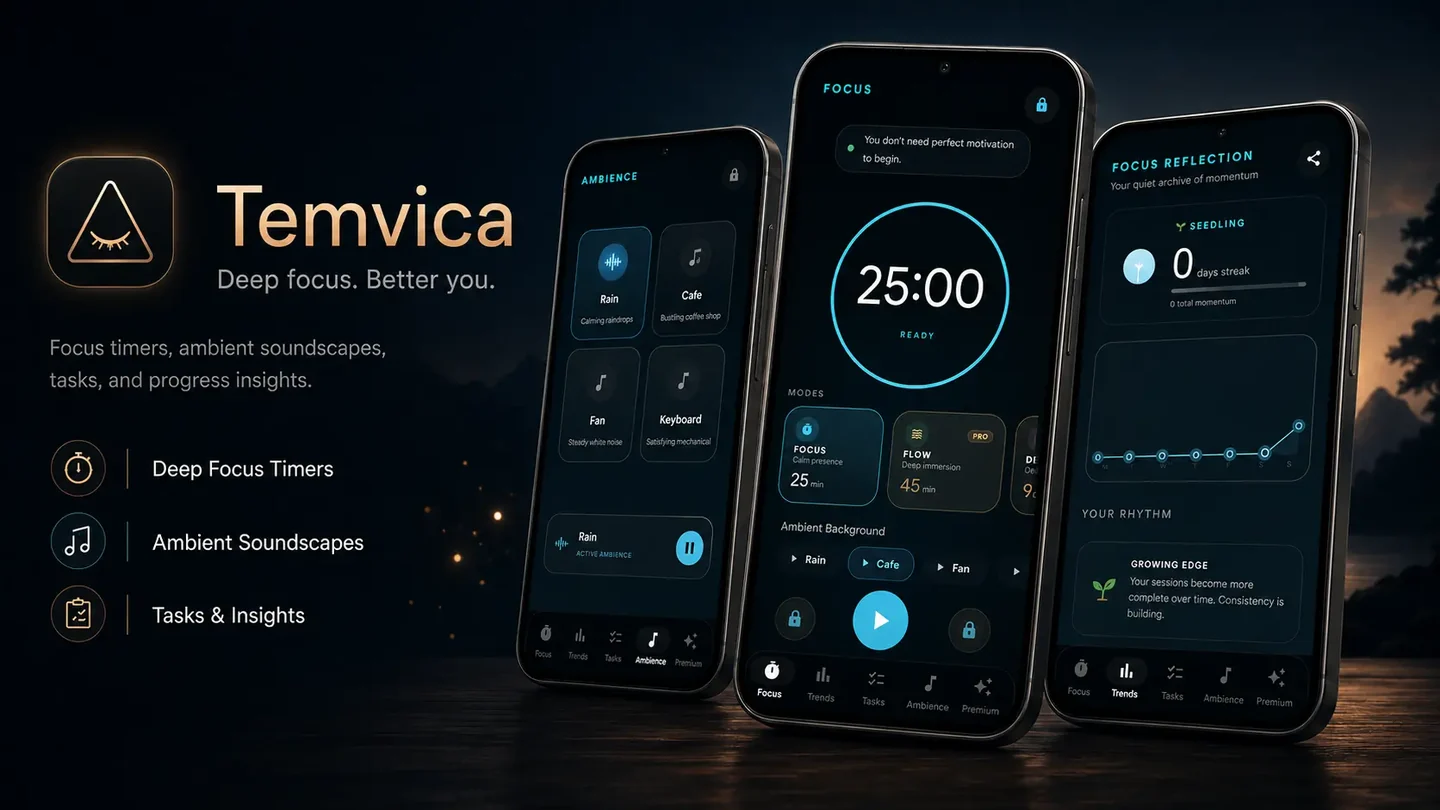
Temvica is an Android Pomodoro timer and focus tool that combines timed sessions, task planning, ambient sounds, and progress insights. You can select a task before starting a session so the timer protects a defined goal rather than measuring unfocused time.
Key features for studying:
- Focus, Flow, Deep, and Rest modes — choose the intensity that fits your current task.
- Custom focus and break durations — adapt the timer to your preferred rhythm.
- Task creation — create tasks and link them to specific sessions.
- Study, work, and personal categories — organise your tasks by subject or project.
- Ambient sounds — rain, café, fan, keyboard, and custom audio for supported users.
- Progress insights — track completed sessions, focused minutes, daily streaks, and weekly activity.
- Background timer and offline support — the timer continues even when the app is minimised or offline.
- Multiple timer styles — customise the look of your focus timer.
Temvica provides structure, but it does not guarantee productivity or replace proper rest. It is a practical tool for students who want a simple way to apply the Pomodoro technique.
Related Articles
- How to use Pomodoro sessions for coding — choose longer focus intervals for programming
- Follow a seven-day digital detox plan — reduce phone distractions while studying
- Block distracting apps during study — create stronger phone boundaries
- Temvica Pomodoro timer for Android
Frequently asked questions
What is the Pomodoro technique for studying?
The Pomodoro technique is a study method where you work on one specific task for a timed interval, traditionally 25 minutes, then take a 5-minute break. After four sessions, you take a longer break of 15–30 minutes.
What does one Pomodoro session mean?
One Pomodoro session traditionally means one focused work interval of 25 minutes, followed by a short 5-minute break. Some people use the term to mean the work interval plus the break combined.
Is 25 minutes enough for studying?
25 minutes can be effective for short tasks like review or memorization. However, longer sessions of 40–50 minutes may work better for deep concentration tasks like mathematics, coding, or essay writing.
How many Pomodoro sessions should a student do?
Beginners often start with 2–4 sessions. A two-hour study block typically includes 3–4 sessions. Stop when concentration and accuracy decline — the number depends on your energy and task difficulty.
Is 25/5 or 50/10 better?
25/5 is easier to start and works well for short tasks. 50/10 may suit deeper concentration for coding, mathematics, or writing. The best choice depends on the subject and your personal focus rhythm.
Can I use Pomodoro for mathematics?
Yes. For complex problem-solving, consider using longer intervals of 40–50 minutes with 10-minute breaks to avoid interrupting your flow.
Should I use my phone during Pomodoro breaks?
Avoid addictive feeds like short videos or social media during short breaks. They can make it harder to return to study. Instead, stretch, drink water, or rest your eyes.
Does Temvica include a Pomodoro timer?
Yes. Temvica is an Android Pomodoro timer and focus tool with Focus, Flow, Deep, and Rest modes, custom durations, task planning, ambient sounds, and progress tracking.
Final thoughts
The Pomodoro technique works by reducing the size of the next commitment:
- Choose one task.
- Focus for a defined period.
- Take a real break.
- Record progress.
- Repeat only when it is useful.
You do not have to follow the technique perfectly. Experiment with session lengths, break activities, and the number of sessions per day. The goal is not to be productive every minute — it is to create a clear beginning, a protected focus period, and a real stopping point.
One action to try today: Choose one small study task, set a 25‑minute timer, and begin without trying to finish everything at once. Even one completed session is a step forward.
Source and practical examples
Francesco Cirillo’s official explanation of the Pomodoro Technique describes the method’s planning, focused work, interruptions and reflection. The subject-specific timings and study plans in this guide are practical starting examples, not proven optimums or guarantees of better grades.